
Hiring today is less about finding candidates and more about filtering them. If you’ve opened a role recently, you’ve likely faced a flood of applications—and a ticking clock.
The Resume Screening Math Problem
Let’s break down what resume screening actually costs you.
The average job posting attracts 250+ applicants. At a median review time of 1 minute 34 seconds per resume, that’s over 6.5 hours just to get through one role.
Now layer in reality:
- Recruiters only spend 7.4 seconds on the first scan
- Only 4.66% of applicants meet 80%+ of job requirements
- Screening for a single hire takes ~23 hours on average
So you’re spending:
- Hours reviewing resumes
- Mostly unqualified candidates
- Under intense time pressure
The real issue isn’t just volume—it’s inefficiency. Most screening methods force you to trade off between speed and accuracy.
Cut 6.5 hours of resume review down to minutes — free, no credit card, up to 400 resumes per process.
This article breaks down five practical resume screening methods used in 2026—what they are, how fast they are, and when to use them.
The 5 Resume Screening Methods
1. Manual Review
How it works: You open each resume and evaluate it yourself, based on experience, skills, and overall fit.
Time required:
- ~1.5 minutes per resume (median)
- 250 resumes = 6+ hours per role
Accuracy:
- High (when done carefully)
- Inconsistent across reviewers
- Prone to fatigue and bias
Cost:
- No direct cost
- High opportunity cost (time)
Best for:
- Low-volume hiring (<50 applicants)
- Senior or niche roles where nuance matters
Reality check: Manual review doesn’t scale. After the first 50–100 resumes, decision quality drops. Fatigue leads to shortcuts, and shortcuts lead to missed candidates.
Takeaway: Use manual review sparingly—mainly for final-stage evaluation, not initial screening.
2. Keyword Matching (ATS)
How it works: Applicant Tracking Systems (ATS) filter resumes based on keywords (skills, job titles, certifications).
Time required:
- Setup: 10–20 minutes
- Screening: Instant
Accuracy:
- Medium
- Good at filtering obvious mismatches
- Poor at understanding context
Cost:
- Typically bundled in ATS software ($50–$500/month)
Best for:
- High-volume roles
- Early-stage filtering
Limitations:
- Misses strong candidates who phrase things differently
- Overweights keyword stuffing
- Doesn’t evaluate depth or quality
Example: A candidate with “Python automation for data pipelines” might be missed if you only filter for “Python developer.”
Takeaway: Keyword matching is fast, but blunt. It’s useful for narrowing the pool—not for making decisions.
3. Structured Scorecards
How it works: You define evaluation criteria (e.g., years of experience, required skills, education) and score each resume consistently.
Time required:
- Setup: 15–30 minutes
- Screening: ~2 minutes per resume
Accuracy:
- High (if criteria are well defined)
- Consistent across reviewers
Cost:
- Low (spreadsheets or ATS features)
Best for:
- Mid-volume hiring
- Teams that want consistency and fairness
Advantages:
- Reduces bias
- Improves alignment across hiring teams
- Creates defensible hiring decisions
Drawbacks:
- Slower than automated methods
- Still requires manual effort
- Can become rigid
Takeaway: Scorecards improve quality but don’t solve the speed problem.
4. Two-Pass Screening
How it works: You split screening into two stages:
- Quick scan (5–10 seconds per resume) to eliminate obvious mismatches
- Deep review of shortlisted candidates
Time required:
- Pass 1: ~30–40 minutes (for 250 resumes)
- Pass 2: ~1–2 hours
- Total: ~2–3 hours
Accuracy:
- Medium–High
- Depends heavily on first-pass judgment
Cost:
- Free (time only)
Best for:
- Recruiters under time pressure
- Roles with clear minimum requirements
Why it works:
- Mirrors how recruiters naturally scan resumes
- Reduces total workload by focusing effort
Risks:
- Good candidates may be rejected too early
- First-pass bias has a large impact
Takeaway: Two-pass screening is one of the most practical manual methods—but still limited by human speed.
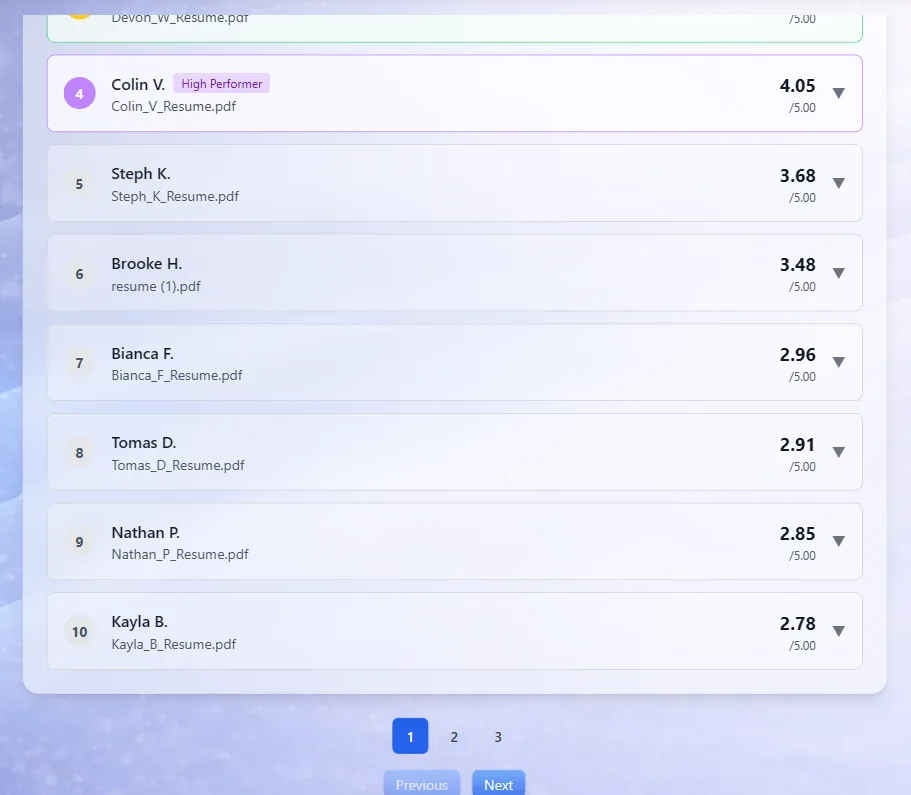
This is what the step looks like in CandidatePilot. The first pass is already done: every resume is ranked, so you only read down from the top.
Skip the first pass and start from a ranked list — free, no credit card.
5. AI Screening
How it works: AI tools analyze resumes against custom criteria and score or rank candidates automatically.
For example, tools like CandidatePilot can:
- Screen up to 400 resumes in under 60 minutes
- Evaluate candidates across multiple dimensions (skills, experience, fit)
- Generate ranked shortlists
Time required:
- Setup: 5–10 minutes
- Screening: 30–60 minutes (for 200 resumes)
Accuracy:
- High (when criteria are well defined)
- Consistent and scalable
Cost:
- Free to low-cost (depending on tool)
Best for:
- High-volume roles (100+ applicants)
- Teams needing speed + consistency
Advantages:
- Eliminates repetitive manual work
- Standardizes evaluation
- Surfaces top candidates quickly
Limitations:
- Requires clear criteria
- Needs human oversight for final decisions
Takeaway: AI screening is currently the only method that improves both speed and quality at scale.
For the mechanics behind that — what gets read, and where a recruiter still has to decide — see our walkthrough of how AI resume screening works.
Comparison Table
| Method | Speed | Accuracy | Cost | Best For |
|---|---|---|---|---|
| Manual Review | Slow | High | Low (time) | Low-volume, senior roles |
| Keyword Matching | Very Fast | Medium | Medium | Early filtering, high volume |
| Structured Scorecard | Slow–Medium | High | Low | Consistency-focused teams |
| Two-Pass Screening | Medium | Medium–High | Low | Time-constrained recruiters |
| AI Screening | Fast | High | Low/Free | High-volume, scalable hiring |
Key insight: Most traditional methods force a trade-off:
- Fast but inaccurate (keyword filtering)
- Accurate but slow (manual review)
AI screening is the only method that significantly reduces both time and effort without sacrificing consistency.
Which Method Should You Use?
The right approach depends on three factors: volume, budget, and role complexity.
If you’re screening <50 resumes:
Use manual review + scorecards
- You can afford depth
- Accuracy matters more than speed
If you’re screening 50–150 resumes:
Use two-pass screening + scorecards
- Quick elimination saves time
- Structured evaluation maintains quality
If you’re screening 150–300+ resumes:
Use AI screening + manual validation
- Automation handles volume
- You focus on final decisions
That workflow is written out end to end in our guide to shortlisting 100 CVs in an hour with AI.
If budget is limited:
- Start with two-pass screening
- Add free AI tools where possible
If roles are highly specialized:
- Use AI or scorecards with detailed criteria
- Avoid keyword-only filtering
If speed is critical (urgent hires):
- Use AI screening immediately
- Combine with a quick human review of top candidates
Once you have picked a method, picking the tool is the other half of the job: we compared prices and free tiers across candidate screening software for small teams.
FAQ
How can I screen resumes faster without missing good candidates? Use a combination of automation (AI or keyword filtering) and structured evaluation. Avoid relying purely on quick manual scans.
Is AI resume screening reliable? Yes—when you define clear criteria. AI is consistent and scalable, but should complement—not replace—human judgment.
What’s the fastest way to shortlist candidates? AI screening or keyword filtering followed by a quick human review of top-ranked candidates.
How many resumes can one recruiter realistically screen in a day? At ~1.5 minutes per resume, about 200–250 resumes would take a full workday—but quality drops significantly after a few hours.
Should I still read every resume? Not in high-volume hiring. Focus on the top 10–20% of candidates after filtering or ranking.
If you’re currently facing a backlog of resumes, the biggest shift is simple: Stop trying to read everything.
Instead, use the right method for your volume—and let tools handle the repetition so you can focus on hiring decisions.
Try CandidatePilot free — screen up to 400 resumes in minutes with AI. Upload your job description, add resumes, and get a ranked shortlist.