
Introduction
You open your inbox and there they are: 200 resumes for a single role.
If you’re like most hiring professionals, you’ll spend about 7.4 seconds scanning each one initially. That’s not a guess—it comes from eye-tracking research by TheLadders. Even when you go deeper, the median total review time is just 1 minute and 34 seconds per resume (InterviewPal, 2025).
The challenge? You’re making high-impact decisions in very little time.
Run this checklist on every resume automatically — free, no credit card.
And the odds aren’t great:
- Only 4.66% of applicants meet 80%+ of job requirements
- 85% of small business hiring managers report few or no qualified applicants (NFIB, Feb 2026)
Without structure, screening becomes inconsistent, subjective, and error-prone.
That’s where a resume screening checklist comes in.
A checklist helps you:
- Apply consistent evaluation criteria
- Reduce bias
- Quickly identify strong candidates
- Avoid missing qualified applicants
Below is a practical, repeatable checklist you can use immediately—whether you’re screening 20 resumes or 2,000.
The 15-Item Resume Screening Checklist
Must-Have Criteria (Baseline Requirements)
These are non-negotiables. If a candidate misses several of these, they’re unlikely to progress.
1. Role-Relevant Experience
Does the candidate have direct or closely related experience?
Look for alignment with the job title, responsibilities, and industry context. Transferable experience counts—but only if clearly demonstrated. If you have to “stretch” to connect their background to the role, it’s likely not a strong fit.
2. Core Skills Match
Do they meet the essential skills listed in the job description?
Focus on hard requirements first (e.g., tools, certifications, technical skills). A candidate meeting 70–80% of required skills is often viable. Below that, the ramp-up time may be too high unless the role is junior.
3. Evidence of Impact
Do they show results—not just responsibilities?
Strong resumes include metrics:
- “Increased revenue by 25%”
- “Reduced churn by 15%”
If a resume only lists duties (“responsible for…”), it’s harder to assess effectiveness.
4. Career Progression
Is there a clear trajectory?
Look for growth:
- Promotions
- Increasing responsibility
- Expanded scope
Flat or repetitive roles over many years may indicate stagnation—though context matters (e.g., stable industries or specialist roles).
5. Education or Required Credentials
Do they meet minimum qualification requirements?
Check for:
- Degrees (if required)
- Certifications
- Licenses
Be careful not to overvalue education if the role prioritizes experience. Many strong candidates are non-traditional.
Quality Indicators (Signals of Strong Candidates)
These help differentiate good candidates from great ones.
6. Clarity and Structure
Is the resume easy to scan in under 10 seconds?
Look for:
- Clear headings
- Bullet points
- Logical flow
If you struggle to extract key information quickly, it’s a usability issue—and may reflect communication skills.
7. Tailoring to the Role
Does the resume feel customized?
Strong candidates align their experience with the role:
- Relevant keywords
- Highlighted achievements
- Adjusted summaries
Generic resumes often signal low effort or mass applications.
8. Consistency and Attention to Detail
Are there errors or inconsistencies?
Check for:
- Typos
- Formatting issues
- Date mismatches
Small errors aren’t always disqualifying—but patterns of sloppiness can be a concern, especially for detail-oriented roles.
9. Relevant Keywords and Tools
Do they use the same language as the job description?
This helps with both human and ATS screening:
- Tools (e.g., Salesforce, Python)
- Methodologies (e.g., Agile, Lean)
A mismatch in terminology may indicate a weaker fit—or simply poor positioning.
10. Tenure and Stability
Do they stay long enough to make an impact?
Frequent short stints (<1 year) can be a concern—but context matters:
- Contract roles
- Startups
- Career transitions
Look for patterns rather than isolated cases.
Red Flags (Risk Indicators)
These don’t automatically disqualify candidates—but they require closer inspection.
11. Unexplained Employment Gaps
Are there long gaps with no explanation?
Gaps are increasingly common and often valid (e.g., caregiving, study, layoffs). The issue isn’t the gap—it’s the lack of context.
A brief explanation can remove uncertainty.
12. Overqualification Without Clarity
Is the candidate significantly overqualified?
If someone with 15+ years of experience applies for a junior role, ask:
- Why this role?
- Will they stay?
Without a clear rationale, retention risk increases.
13. Job Hopping Without Progression
Do they frequently switch roles without growth?
Moving every 6–12 months can signal:
- Lack of commitment
- Performance issues
- Poor fit
But again—consider industry norms (e.g., consulting, startups).
14. Vague or Generic Descriptions
Are achievements unclear or missing?
Phrases like:
- “Worked on various projects”
- “Helped improve performance”
These lack substance. Strong candidates quantify and specify their contributions.
15. Mismatch Between Resume and Role
Does the resume feel misaligned?
Examples:
- Applying to marketing roles with no marketing experience
- Technical resumes for non-technical roles
Given that only 4.66% of applicants meet most requirements, this is common—but still important to filter early.
How to Use This Checklist
A checklist is only useful if applied consistently.
Here’s a simple way to operationalize it:
1. Create a Scoring System
Assign a score to each item:
- 0 = Not met
- 1 = Partially met
- 2 = Fully met
Total possible score: 30 (15 items × 2)
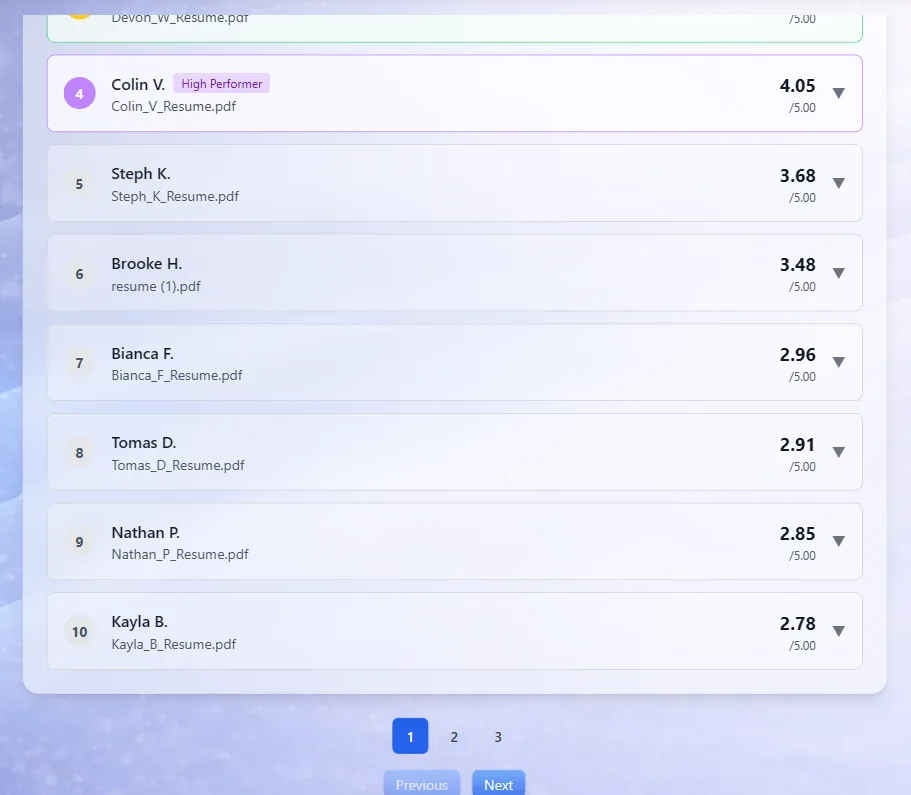
This is what the step looks like in CandidatePilot. Every applicant ranked against the same criteria, so positions 4 to 10 stay as visible as the top three.
Skip the manual scoring and get a ranked shortlist — free, no credit card.
2. Weight the Categories
Not all criteria are equal:
- Must-Haves: 50% weight
- Quality Indicators: 30%
- Red Flags: 20% (reverse scoring)
This ensures critical requirements matter most.
3. Set a Threshold
Define what “qualified” means:
- 24+ = Strong candidate
- 18–23 = Consider
- <18 = Reject
Adjust based on role difficulty and applicant pool quality.
4. Standardize Across Reviewers
If multiple people are screening:
- Use the same checklist
- Align on scoring definitions
- Run calibration sessions
Consistency reduces bias and improves decision quality.
5. Document Decisions
Keep brief notes:
- Why they passed or failed
- Any concerns
This helps with:
- Auditability
- Candidate feedback
- Future hiring decisions
Common Screening Mistakes
Even experienced recruiters fall into these traps.
1. Overvaluing Prestigious Names
Big companies and top universities can bias decisions.
But:
- Great candidates come from everywhere
- Brand names don’t guarantee performance
Focus on impact and skills, not logos.
2. Penalizing Employment Gaps
Gaps are more common than ever.
Automatically rejecting candidates with gaps can:
- Reduce diversity
- Exclude strong talent
Instead, look for explanations and context.
3. Relying on Gut Feeling
“I just have a good feeling about this one.”
Unstructured intuition leads to:
- Inconsistency
- Bias
- Poor hiring decisions
Use a checklist to anchor decisions in evidence.
4. Ignoring Transferable Skills
Candidates from adjacent fields can be excellent hires.
Example:
- Customer support → Customer success
- Teaching → Training or L&D
Look beyond exact matches.
5. Screening Too Rigidly
A perfect match is rare.
If you only advance candidates who meet 100% of requirements, you’ll miss strong hires. Remember:
- Only a small percentage meet most criteria
- Potential matters
Can AI Do This Automatically?
Yes—and this is where tools like CandidatePilot come in.
Instead of manually applying a checklist, AI can:
- Evaluate resumes against structured criteria
- Score candidates consistently
- Highlight strengths and gaps
- Process hundreds of resumes in seconds
Key Differences from Manual Screening
Manual Checklist:
- Time-consuming
- Subject to bias
- Hard to scale
- Inconsistent across reviewers
AI-Powered Screening:
- Fast and scalable
- Consistent scoring
- Objective evaluation
- Easily customizable criteria
CandidatePilot, for example, acts like an automated version of this checklist—analyzing each CV against the criteria derived from your job description and ranking candidates accordingly.
The goal isn’t to replace human judgment, but to:
- Reduce workload
- Improve consistency
- Surface the best candidates faster
If cost is the blocker, several of these tools have a free tier — we checked what each one caps in our roundup of free AI resume screening tools.
FAQ
What is a resume screening checklist?
A structured set of criteria used to evaluate resumes consistently. It helps recruiters quickly assess candidate fit and reduce bias in decision-making.
How many criteria should a checklist include?
Typically 10–15 criteria is ideal. Fewer may miss important signals; more can slow down screening.
Should all criteria be weighted equally?
No. Core requirements (skills, experience) should carry more weight than secondary indicators (formatting, keywords).
How do you handle borderline candidates?
Use a “consider” category and review them in a second pass. Context and comparison often clarify decisions.
Can this checklist be used across all roles?
Yes, but it should be adapted:
- Technical roles → emphasize skills and tools
- Leadership roles → emphasize impact and progression
Is AI resume screening reliable?
When configured properly, AI can be more consistent than manual screening. However, it should complement—not replace—human review.
Bottom line: A structured resume screening checklist turns a chaotic process into a repeatable system. Whether you apply it manually or automate it, the goal is the same: identify the best candidates quickly, fairly, and consistently.
Try CandidatePilot free — automate your screening checklist. Upload your job description, add resumes, and get a ranked shortlist in minutes.