
Introduction
Hiring has become a volume problem.
The average corporate job posting receives around 250 resumes (Glassdoor)—and that number is often much higher for remote or popular roles. With the rise of easy-apply platforms and AI-generated applications, recruiters are now dealing with hundreds or even thousands of candidates per role.
At the same time, human attention hasn’t scaled. Recruiters typically spend 6–8 seconds scanning a resume initially (Ladders eye-tracking study), and even for promising candidates, most hiring managers spend just 1–3 minutes reviewing each resume.
Do the math:
- 250 resumes × 1–3 minutes each = 4 to 12+ hours per role
- Multiply that across multiple open roles, and hiring quickly becomes unsustainable
Turn 250 resumes into a ranked shortlist in minutes — free, no credit card, up to 400 resumes per process.
This is why automation has become standard. Today, 75% of resumes are filtered out before a human sees them (Harvard Business School), and up to 90% of employers use ATS or similar tools (Jobscan).
But traditional systems were built for filtering—not understanding.
That’s where AI resume screening comes in.
Instead of relying on rigid keyword filters, modern AI tools evaluate candidates based on context, experience, and overall fit—helping teams screen resumes with AI, rank candidates, and shortlist faster without sacrificing quality.
In this guide, we’ll break down how it works, how it compares to traditional ATS tools, and how you can use it to screen hundreds of resumes in minutes.
What is AI resume screening?
AI resume screening is the use of artificial intelligence—typically natural language processing (NLP) and machine learning—to evaluate, score, and rank job applicants automatically.
Unlike traditional systems, which rely heavily on keyword matching, AI screening tools analyze resumes more like a human would: by understanding meaning, context, and relevance.
Key characteristics
A modern AI hiring tool typically does the following:
- Extracts structured data from resumes (skills, experience, education)
- Interprets job requirements semantically (not just keywords)
- Scores candidates across multiple evaluation criteria
- Ranks applicants based on overall fit
- Provides explanations for each score
Why it matters
Traditional hiring tools were designed to reduce workload—but often at the cost of accuracy.
For example:
- 99.7% of recruiters use keyword filters in ATS searches (Jobvite)
- Yet keyword filtering often misses strong candidates who use different phrasing
AI changes that.
Instead of asking “Does this resume contain the exact keyword?”, AI asks:
- “Does this candidate demonstrate the required skill?”
- “How relevant is their experience to this role?”
- “How strong is their overall profile?”
This shift—from keyword matching to semantic evaluation—is what makes automated candidate screening significantly more effective.
Adoption is accelerating
AI is no longer experimental in hiring:
- 87% of employers use AI in at least one stage of hiring (SHRM)
- 99% report using AI in some hiring capacity (Resume Builder survey)
In other words, AI screening is quickly becoming the default—not the exception.
If you are still deciding whether AI is the right approach at all, we compared it against manual review, keyword filters and scorecards in our breakdown of five resume screening methods.
How AI resume screening works
To understand how to screen resumes with AI, it helps to break the process into steps.
1. Job description analysis
Everything starts with the job description.
AI systems analyze the role and extract key requirements, such as:
- Core skills (e.g., Python, B2B sales)
- Experience level (e.g., 5+ years)
- Domain expertise (e.g., fintech, SaaS)
- Soft skills (e.g., leadership, communication)
More advanced tools go further by identifying the specific criteria that matter for each role and prioritizing them based on relevance. This means different roles produce different evaluation frameworks automatically, rather than relying on a one-size-fits-all checklist.
2. Resume parsing
Next, the system processes each resume.
This involves:
- Extracting structured data (skills, roles, companies, dates)
- Converting unstructured text into machine-readable format
- Handling different file types (PDF, DOCX, images, etc.)
This step is similar to traditional ATS—but AI goes deeper by preserving context.
3. Semantic analysis
This is where AI differs fundamentally.
Instead of matching keywords, AI evaluates meaning.
For example:
- “Built REST APIs in Node.js” → recognized as backend engineering
- “Managed enterprise accounts” → mapped to B2B sales experience
- “Led cross-functional teams” → identified as leadership
This allows candidate evaluation AI to identify strong candidates even if they don’t use exact job-description wording.
4. Scoring and ranking candidates
Each resume is evaluated across the predefined dimensions and receives a structured assessment — not just a pass/fail, but an indication of how well the candidate fits each requirement and why.
These individual evaluations are then combined into an overall score, producing a ranked shortlist. This is the core output of a resume ranking tool: top candidates are automatically identified, weak matches are deprioritized, and recruiters can focus their time on the top 5–10%.
5. Generating insights
Beyond the ranking, modern AI tools provide:
- Strengths and gaps per candidate
- Comparisons across top applicants
- Practical recommendations (like who to interview first and what to ask them)
This turns screening from a filtering task into a decision-support process. Instead of manually reviewing hundreds of resumes, recruiters get a structured shortlist with actionable context — typically in minutes.
AI screening vs. traditional ATS
While both systems aim to streamline hiring, they operate very differently.
Comparison table
| Feature | Traditional ATS | AI Resume Screening |
|---|---|---|
| Core method | Keyword matching | Semantic understanding |
| Flexibility | Rigid filters | Context-aware evaluation |
| Candidate scoring | Limited or none | Multi-dimensional scoring |
| Explainability | Low | High (with reasoning) |
| Ranking | Basic filtering | Weighted ranking |
| Speed | Fast filtering | Fast + intelligent ranking |
| Accuracy | Depends on keywords | Higher contextual accuracy |
Key differences explained
1. Keyword vs. meaning
ATS systems rely heavily on exact matches.
That’s why many qualified candidates get filtered out—simply because they didn’t use the “right” keywords.
AI tools interpret meaning instead, improving recall and fairness.
2. Filtering vs. ranking
Traditional systems answer:
“Who should be excluded?”
AI systems answer:
“Who is the best fit—and why?”
This shift is critical for high-volume hiring.
3. Black box vs. explainable
Many ATS tools provide little insight into why candidates are filtered.
AI tools increasingly offer:
- Score breakdowns
- Written explanations
- Transparent evaluation criteria
This improves trust and decision-making.
4. Static vs. adaptive
ATS filters are typically static.
AI systems can adapt to:
- Different roles
- Custom evaluation criteria
- Changing hiring priorities
What to look for in an AI screening tool
Not all CV screening software is created equal.
Here are the key factors to evaluate.
1. Explainability
A good system should answer:
- Why is this candidate ranked highly?
- What are their strengths and gaps?
Without explanations, AI becomes a black box—hard to trust and justify.
2. Customizable criteria
Avoid tools with fixed scoring models.
Look for:
- Customizable evaluation criteria
- Adjustable priorities per role
- Role-specific criteria
This ensures the tool reflects your hiring priorities—not generic assumptions.
This is what it looks like in CandidatePilot. The criteria come straight from the job description you upload, so each role is evaluated on what it actually requires.
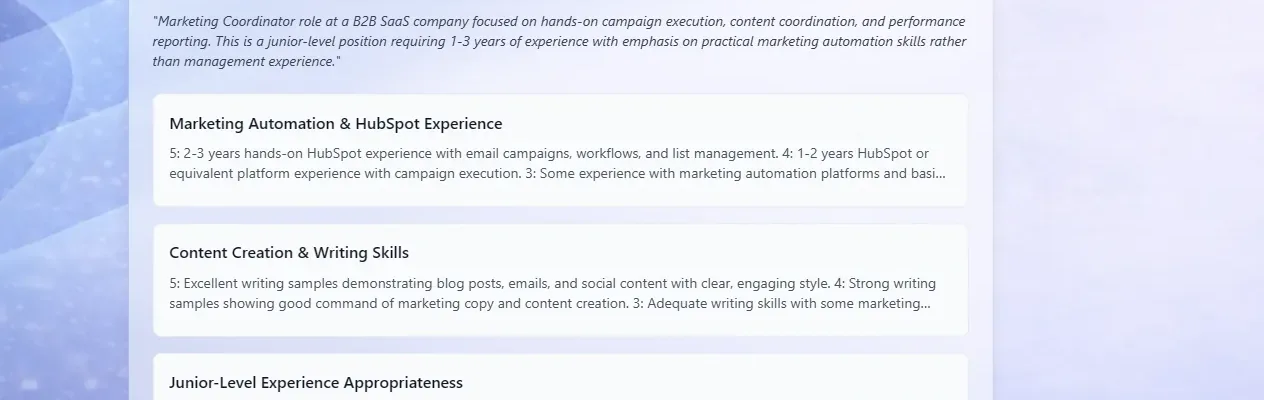
See which criteria your job description produces — free, no credit card.
3. Multi-format support
Candidates submit resumes in many formats:
- DOCX
- Images (JPG, PNG)
Your tool should handle all of them reliably.
4. Speed at scale
Speed is one of the biggest benefits of automated candidate screening.
Look for tools that can:
- Process 100–200 resumes quickly
- Deliver results in under an hour
- Maintain accuracy at scale
5. Cost and accessibility
Many enterprise tools are expensive and complex.
For startups and lean teams, prioritize:
- Transparent pricing (or free tools)
- Self-service workflows
- No long implementation cycles
Several tools advertise a free tier that stops short of AI ranking, so check what each plan actually includes before you commit — we went through that across eight free AI resume screening tools.
6. Data privacy and compliance
Especially for US and European teams, ensure:
- GDPR compliance
- Secure data handling
- Clear data retention policies
Common mistakes when using AI for screening
AI is powerful—but not foolproof.
Here are common pitfalls to avoid.
1. Over-relying on automation
AI should support decisions—not replace them.
Even though 93% of hiring managers emphasize the need for human involvement (SHRM), teams sometimes over-automate.
Best practice:
- Use AI for shortlisting
- Keep humans in final decisions
2. Not customizing criteria
Using default criteria can lead to poor results.
Every role is different.
Failing to adjust:
- Weights
- Skills
- Priorities
…can result in irrelevant rankings.
3. Ignoring edge cases
AI may struggle with:
- Career switchers
- Non-traditional backgrounds
- Unusual career paths
These candidates often require human judgment.
4. Skipping validation
Always review:
- Top-ranked candidates
- Borderline cases
This helps ensure the system aligns with your expectations.
5. Not monitoring bias
AI can reflect biases in data.
Regularly check:
- Diversity of shortlisted candidates
- Fairness across groups
Responsible use is essential.
CandidatePilot: screen 400 resumes in under an hour
If you’re looking for a practical way to apply everything in this guide, CandidatePilot is designed specifically for high-volume screening.
How it works
CandidatePilot is a free, self-service AI resume screening tool built for speed and simplicity. You upload your job description, the AI understands what profile you’re looking for, you upload your candidates’ resumes, and within minutes you get a ranked shortlist with clear explanations of why each candidate was evaluated the way they were — plus a recommendation of who to interview first.
No setup, no integration, no contract. Just upload and get results.
Why it’s useful
- Free and self-service — no demo calls, no sales cycles
- Handles high volume — up to 400 resumes per process
- Explainable results — every evaluation includes reasoning, not just a score
- Fast — from upload to ranked shortlist in under 60 minutes
For teams that need to move fast without an enterprise ATS budget, CandidatePilot solves the screening bottleneck.
Try CandidatePilot free — upload your job description and resumes and get a ranked shortlist in minutes.
FAQ
1. Is AI resume screening accurate?
AI screening is generally more consistent than manual review, especially at scale. However, it’s not perfect and should be combined with human judgment.
2. Can AI replace recruiters?
No. AI is best used to automate repetitive tasks like screening and ranking. Final decisions, interviews, and cultural fit assessments still require humans.
3. Does AI screening introduce bias?
It can—if not properly managed. That’s why explainability, transparency, and human oversight are critical.
4. How many resumes can AI handle?
Most modern tools can process hundreds or thousands of resumes. Tools like CandidatePilot are optimized for batches of up to 400 at a time.
5. Is AI screening only for large companies?
No. In fact, smaller teams often benefit the most, since they lack dedicated recruiting resources and need to move quickly.
Final thoughts
Hiring volume isn’t going down—it’s increasing.
With hundreds of applicants per role and limited recruiter time, manual screening alone is no longer sustainable.
AI doesn’t eliminate the need for human judgment—but it dramatically improves efficiency by:
- Reducing screening time
- Improving candidate ranking
- Providing structured insights
For teams looking to shortlist candidates automatically without sacrificing quality, AI resume screening is no longer optional—it’s becoming essential.
Next step: if you are choosing a tool rather than learning the concept, our guide to candidate screening software for small teams compares what each option costs and what it actually screens.
Try CandidatePilot free — upload your job description, add your resumes, and get a ranked shortlist in minutes.