
To shortlist 100 CVs in an hour, stop reading CVs. Decide what the role actually requires, run all 100 through an AI tool that evaluates every CV against those requirements, and spend your hour at the top of a ranked list instead of in the pile. Five steps: criteria from the JD, one bulk upload, a ranked list, a cut to five to eight names, and a PDF the hiring manager can act on. The tool does the reading. You still make the call.
You know the shape of this week. The JD went live on Monday, there are 96 CVs in the inbox by Thursday, and the hiring manager has already asked twice when the shortlist is coming. Reading them properly is a day you do not have; skimming them is how you end up defending a shortlist you are not confident in.
Upload your JD and your CVs and get a ranked shortlist in minutes — free, no credit card, up to 400 CVs per role.
The workflow below is written for the way agency and small-team recruiters actually work: one live role, one pile of CVs, one hiring manager waiting. It takes about an hour end to end, and most of that hour is your judgement, not the tool.
Step 1: Pull your shortlisting criteria straight from the JD
A shortlist is only as good as the list of things you shortlisted against. Before you open a single CV you need that list in writing: the three or four things a candidate must have to be worth an interview, and the handful of things that would move someone up. Recruiters who skip this end up shortlisting on impression, which is exactly the shortlist that falls apart when the hiring manager asks why candidate four sits above candidate nine.
You can write the list yourself from the JD in ten minutes, and our 15-item screening checklist of what to look for in every CV is a reasonable baseline to start from. Or you can upload the JD as a PDF and let CandidatePilot identify what to evaluate from the posting itself, then edit that list before anything runs. Either way the useful move is the same: put the criteria on paper before you touch the pile.
What you get: a written set of criteria you can defend to the hiring manager afterwards, instead of a gut feeling you have to reconstruct from memory.
One thing here is worth doing because it is the most common complaint we hear about shortlists. If the role is junior, say so explicitly. There is a free-text field for aspects the JD does not cover, and writing something like "this is a junior role; do not favour profiles with 8+ years or previous management responsibility" visibly changes the order of the list. Without it, the overqualified candidates who will never accept the salary drift to the top, because on paper they match everything.
Step 2: Upload the whole pile of CVs in one go
The second bottleneck is mechanical. A hundred CVs means a hundred files to open, and any tool that makes you handle them one at a time has already cost you the hour. Select the whole folder, drag it in, start the run. CandidatePilot takes up to 400 CVs in a single role, which covers almost any single-vacancy shortlist an agency runs, and the evaluation finishes in minutes while you get on with something else. You get an email when it is done, so you do not have to sit and watch a progress bar.
Two practical notes for a clean batch. First, ordinary text PDFs behave better than anything else: a CV exported from a design template, with the dates buried inside a sidebar graphic, is a CV that any reader, human or machine, will handle badly. Second, do not pre-filter the pile before uploading it. The value of a ranked list comes from having ranked everything, including the ones you would have skipped on the file name alone, and the marginal cost of including them is nothing once the batch is running.
What you get: one role, one batch, no per-CV clicking, and your hour spent on the shortlist rather than on file handling.
Step 3: Read the ranked list instead of the CVs
This is the step that actually saves the day, and it is a change of habit more than a change of tool. When the run finishes you get every candidate in order, each with a short written explanation of why they landed where they did. You read the explanations, not the CVs, and you open the actual CV only when an explanation makes you curious or suspicious.
That is a different job from the five methods compared in our guide to getting through a pile of CVs faster, which is about raw speed. This step is about arriving at an order you can argue with. The explanation matters more than the figure next to it, because the explanation is what you will paste into the note to the hiring manager, and it is what lets you catch a bad call in ten seconds instead of trusting a number you cannot audit.
What you get: about 100 CVs reduced to roughly 20 minutes of reading, with the reasoning attached to every name so you can check the tool rather than take its word for it.
Step 4: Cut the list down to a shortlist of five to eight
A ranked list is not a shortlist. Ranking is the input; shortlisting is the decision you make on top of it, and it is the part no tool should make for you. For a single role, five to eight names is the working range: enough that the hiring manager has a genuine choice, few enough that you can get them all interviewed inside a week before the strongest ones accept something else.
Work down from the top, then do the thing most people skip and read two or three of the candidates sitting just below your cut line. If none of them surprise you, the cut is in the right place. If one does, your criteria were wrong rather than the candidate. After that, apply everything the ranking never had the data to see: notice period, current location against whether the role is on-site, salary expectation, and work authorisation for the market you are hiring into. Those knock people out of a shortlist far more often than skills do, and they are usually a two-line message rather than a judgement call.
What you get: five to eight names, each with a written reason, plus a side-by-side comparison of the strongest three so you can see where they differ instead of describing it in a paragraph.
Step 5: Send the hiring manager a PDF and an interview guide
The last twenty minutes decide whether the hour was worth it. A shortlist that arrives as a chain of forwarded CVs creates a meeting; a shortlist that arrives as one document gets a decision. From the results screen you can download a PDF report with the summary of the role, the recommended finalists and the reasoning behind them, the detail on the strongest candidates, and the full ranking of everyone else, so nobody has to ask what happened to the other 92. It carries a confidential watermark, which matters when the file leaves your inbox and lands in a client account.
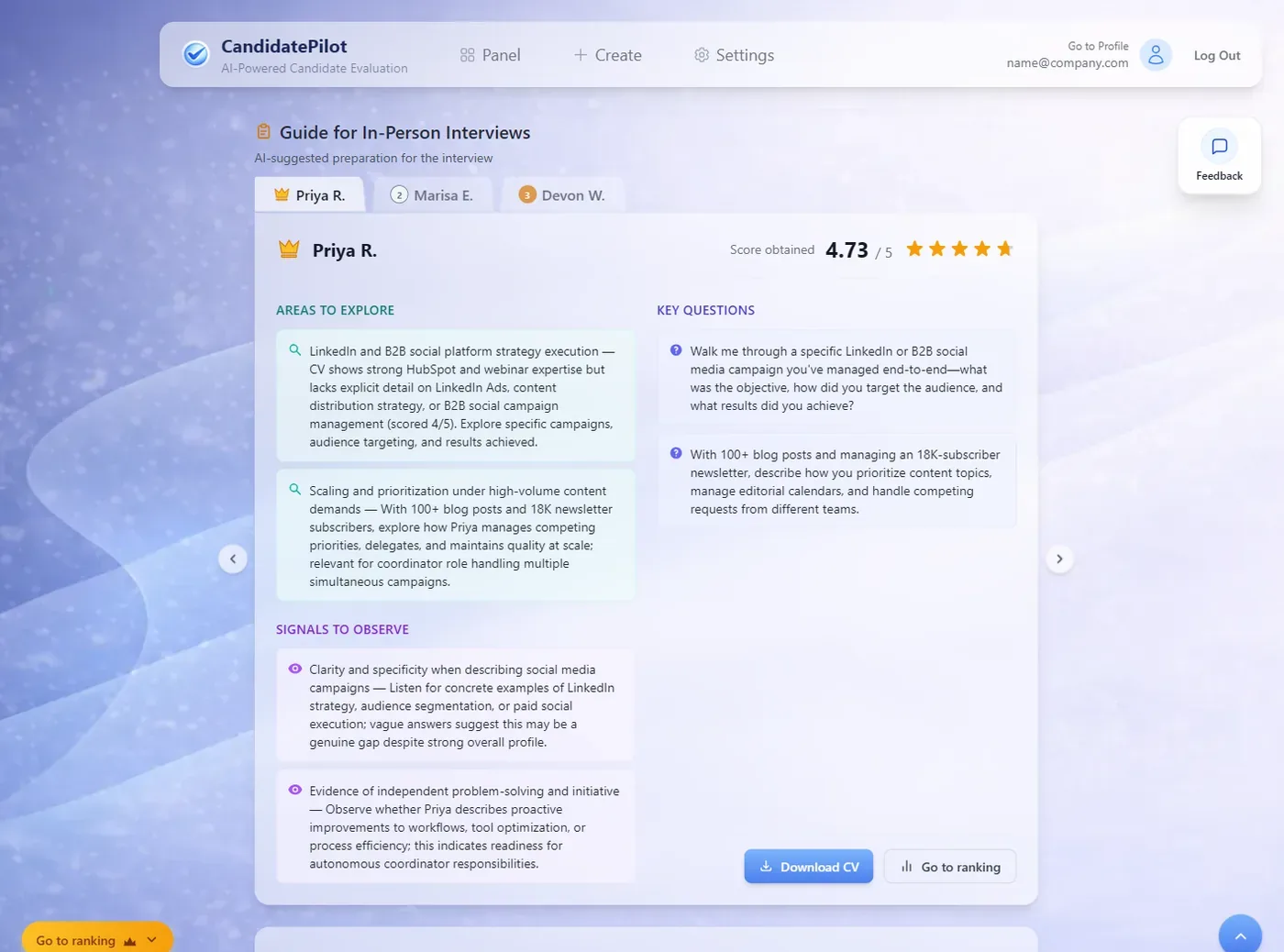
You also get an interview guide for each shortlisted candidate: the areas worth exploring, the questions to ask and the signals to watch for. For an agency that is the difference between a client interviewing your candidates properly and a client improvising and then blaming the shortlist. For a small internal team it means the two people running the interviews ask the same questions and can actually compare the answers afterwards.
What you get: one PDF the hiring manager can act on without a call, and interview questions that came from the role rather than from memory.
What the result looks like
Three screens carry most of the value, and it helps to know what you are looking at before you run your first role.
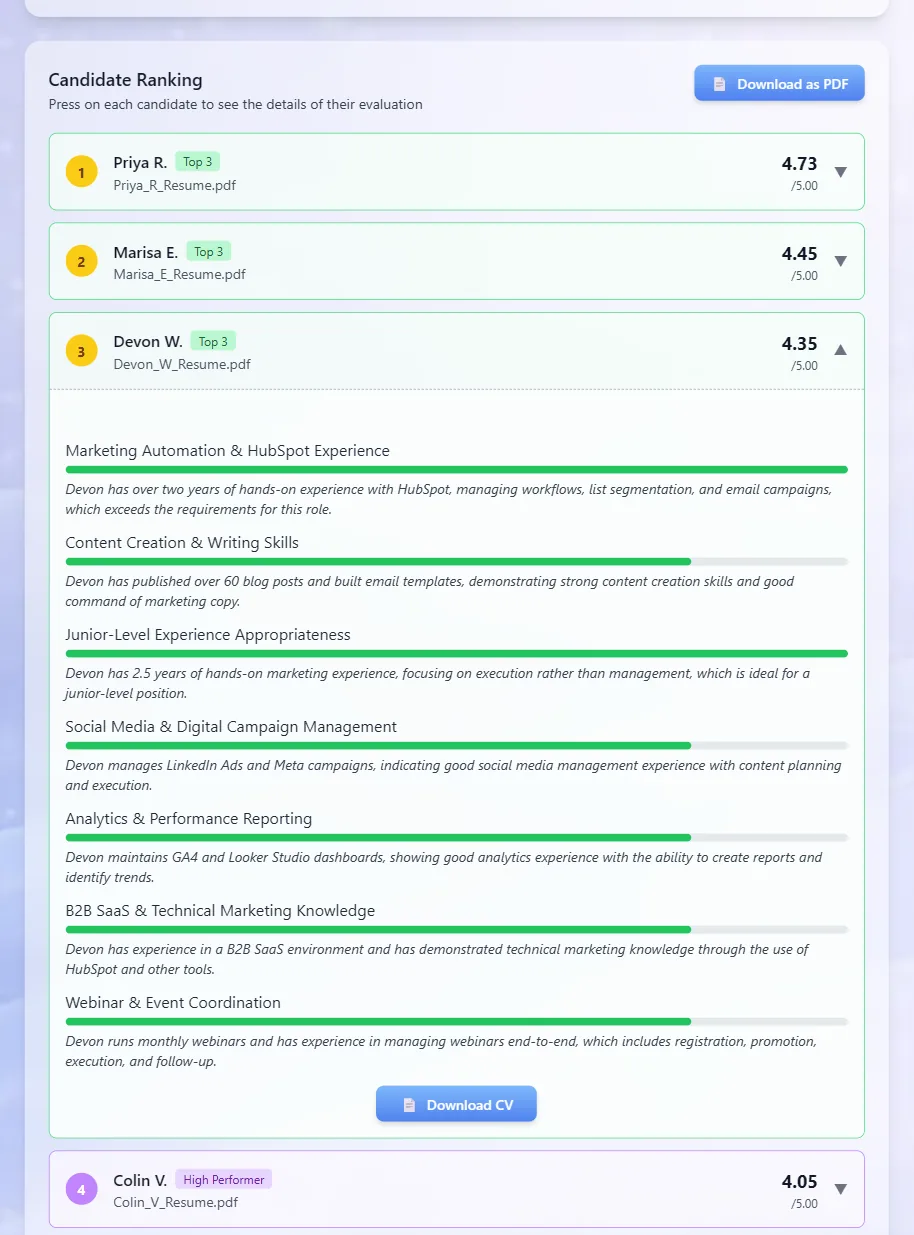
The ranked list is the raw material for the shortlist: every candidate in order, and you can open any of them to see why they scored the way they did, so you can work down from the top and stop where the fit stops.
The comparison chart is what you open when two or three finalists are close and you cannot say why one is ahead. It shows where each of them is strong and where each of them is thin, on the same axes, which is far quicker to read than three paragraphs saying the same thing.

The interview guide is what the hiring manager actually uses. Each shortlisted candidate gets the areas worth probing, the questions to ask and the signals to watch for, all of it drawn from the gap between that CV and this role.
Run your own role and see the ranked shortlist — free, no credit card, and a 100-CV role fits in a single run.
CV shortlisting software in 2026
Most of the tools that turn up for "CV shortlisting software" are one of three things: a full ATS that happens to include some screening, a per-CV credit tool, or a free tier with a hard cap. The table below covers the ones with a published price or an explicit free plan, so you can see what you would actually be buying.
| Tool | Free plan | Entry price | Pay per use or subscription | Minimum commitment | AI that ranks CVs | Languages / markets | CV limit |
|---|---|---|---|---|---|---|---|
| CandidatePilot | Yes: 2 welcome evaluations, no card | US$5 for 15 evaluations, US$10 for 40 | One-off packs | None, no subscription | Yes, with a written reason per candidate | English and Spanish | Up to 400 CVs per role |
| Rankid | Yes: 50 credits a month, no card | US$19 one-off for 1,000 credits, 1 credit per CV scored | One-off credit bundles, credits do not expire | None | Yes | English; no Spanish found | Counted per CV, no per-run cap published |
| Marxel | Yes: GBP 0 forever, 200 CVs a month, no card | £49 a month (Starter), in pounds | Subscription | Monthly | Yes, groups candidates as Aligned, Potential, Hold or Unclear with explicit reasoning | English, aimed at UK hiring teams | 200 CVs a month and 1 active job on the free plan |
| CVscanr | No: 7-day trial, 40 CVs, no card | US$9.90 a month billed annually (Growth) | Subscription | Annual billing at the entry price | Yes | English; Spanish not verified | 1,000 CVs and 5 job postings a month on Growth |
| Resume Screening AI | Yes, no card, but its own pages publish two different caps | US$0.07 per CV with no subscription, or Starter at US$200 a year | Either: pay per CV, or annual plan | None on pay as you go | Yes | English; Spanish not verified | No per-run cap published |
| Manatal | No: 14-day trial, no card | US$15 per user a month billed annually, US$19 month to month (Professional) | Subscription per user | Month to month possible at US$19 | Yes, automatic candidate scoring on every paid plan | Site offers Spanish; global | 15 jobs and 10,000 candidates on Professional |
| Breezy HR | Yes: Bootstrap, unlimited candidates, 1 active position | US$157 a month billed annually, US$189 month to month (Startup) | Subscription, flat per company | Month to month possible at US$189 | No, not in any plan: its AI evaluation is a paid add-on, credits from US$30 per 100,000 | Not verified | Unlimited candidates, 1 active position on the free plan |
Prices, plans and limits were read on each vendor's own pricing page on 9 September 2026 and can change; check before you buy.
Watch the unit before you compare the prices. Rankid counts credits, and it says so plainly: one credit per CV scored, so US$19 buys 1,000 CVs. CandidatePilot counts processes: US$10 buys 40 evaluations, and each evaluation holds up to 400 CVs. Putting "1,000" next to "40" in the same column would be nonsense. The only honest comparison is what one shortlisting round costs, and for a single role of 100 CVs that comes out at roughly US$1.90 on a Rankid bundle, US$7 on Resume Screening AI at seven cents a CV, US$0.25 on a CandidatePilot pack, and zero on either free plan. The same trap runs the other way on volume: Rankid tops up 50 free CVs every month, which suits a steady trickle, while CandidatePilot gives you fewer runs but a much bigger pile per run, which suits one busy role at a time.
The other axis worth checking is whether the AI is included at all. In Breezy HR, the free plan gives you CV parsing rather than evaluation, and the actual AI evaluation is a credit add-on on every tier. Manatal includes candidate scoring on all of its paid plans but bills per recruiter seat every month, so a single month for one user costs almost twice a CandidatePilot pack of 40 evaluations. If what you actually need is a system of record with a pipeline and a careers page, not a filter for one live role, our buyer's guide to screening software for small teams works through that decision instead. And if the budget for this is genuinely zero, we listed the free AI screening tools and exactly what each one caps.
To be clear about where we sit: CandidatePilot is not an ATS and does not try to be one. It is the filter you use today, for this role, on this pile of CVs.
Two things that quietly ruin a shortlist
A badly formatted CV gets a bad reading, from any reader. Dates rendered inside a graphic, job titles that only appear in a header image, a scanned document with no text layer: these come out worse than they deserve, and that is as true of a tired human at 6pm as it is of a tool. Two habits fix most of it. Ask candidates for a plain PDF with clear dates and job titles, in the JD itself if you can. And when a name lands surprisingly low, look at the file before you look at the candidate; if it is a design-heavy or scanned CV, open it yourself rather than letting the position stand.
Overqualified candidates float to the top unless you say the role is junior. This is the failure we see most often, and it is the easiest to avoid. A candidate with twelve years and a team behind them matches every requirement of a junior posting on paper, so any evaluation done on paper puts them first, and then they decline the offer or leave in four months. Say the level out loud in the field for aspects the JD does not cover, exactly as in step 1, and the list reorders around the people who will actually take the job.
FAQ
What is the difference between shortlisting, screening and ranking?
Screening is the pass that removes the CVs that do not meet the basics. Ranking puts the survivors in order against the role. Shortlisting is the decision at the end: the five to eight names you send to interview, with a reason attached to each. The three get used interchangeably, but the distinction matters when the hiring manager asks what happened, because only the last one is a decision you made. If you work with US clients you will also hear the same pile called resumes and the whole activity called screening; the vocabulary changes, the job does not.
How many CVs should you shortlist for interview?
Five to eight for a single role. That is enough for the hiring manager to have a real choice and few enough that everyone can be interviewed inside a week, before the strongest candidates accept something else. Fewer than three gives you no basis for comparison and no cover if one drops out. More than ten and the interview slots slip into a second and third week, which is the most common reason a good shortlist ends in no hire.
Can I shortlist CVs for free?
Yes. CandidatePilot gives you 2 welcome evaluations, with no credit card and no subscription, and each evaluation holds up to 400 CVs, so a 100-CV role fits inside a single free run. If you need more than that, the packs are one-off purchases at US$5 for 15 evaluations and US$10 for 40, with nothing recurring attached. Several other tools also have real free tiers with different shapes of limit, and they are compared in the table above.
Does CV shortlisting work with CVs in other languages?
CandidatePilot works with CVs in English and Spanish, and the interface exists in both. We do not claim support for any other language, which matters if you recruit in the Gulf or in India and your pile is mixed. If the CVs are mostly in Arabic, Hindi or French, run a handful through first and look at whether the explanations make sense before you commit a whole role to it.
Before you send that shortlist
An hour is enough for 100 CVs, but only if you spend it on the right things. The criteria come from the JD before you open anything, the pile goes up in one batch, you read the reasoning rather than the documents, you cut to five to eight names and check the ones just under the line, and the hiring manager gets a PDF instead of a forwarded folder. What you gain is not just the afternoon: it is a shortlist you can explain, name by name, when someone asks why candidate four is on it and candidate nine is not. That is the part that survives the interview stage, and it is the part a rushed skim never gives you.
Try CandidatePilot free — upload your job description, add your resumes, and get a ranked shortlist in minutes.